




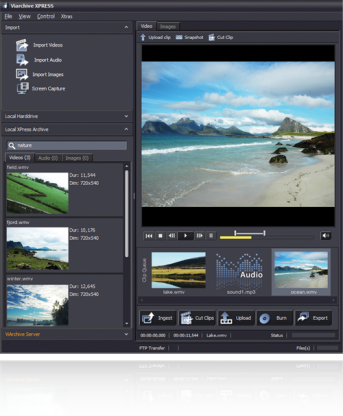
- FROM UPLOAD
Cut, text & upload... XPRESS is developed with the special needs of environments in mind, where only segments of video files are of interest to upload to the archives, like for example surveillance, police and defense. XPRESS provides a fast and user friendly way of cutting out the needed segment, adding metadata and uploading it to the server.
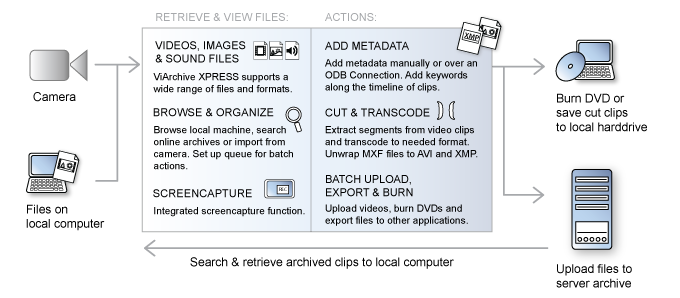
Import media from camera or local harddrive and add your selected clips or segments to the queue. Then you can for example add metadata, cut, transcode or upload all files in one operation.

 apply metadata apply metadata |
uploade files to server archives |
burn files to data DVD |
| cut and transcode media files |
ingest files to local harddrive |
export files to other applications |
ViArchive XPRESS also provides one-click cutting, transcoding and uploading: define the segment in each clip which should be uploaded, press upload and the clips are cut, transcoded and uploaded in one simple action.
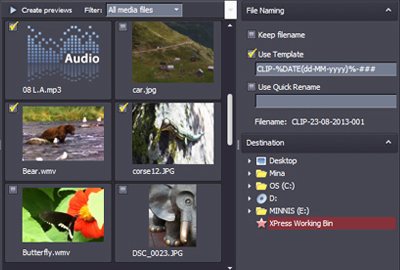
When the needed files have been selected, they can be imported to the required destination in batch.
The import media panel allows users to keep original file names or use templates to rename files.
Metadata... Users can easily add or change file info and keywords. The ViArchive XPRESS automatically recognizes previously saved sidecar to loaded video file. If the file has no sidecar, it is created when the user adds and saves metadata. The metadata layout is fully customizable in the template editor included in the application, and can be configured with masks for accurate filling in i.e. serial numbers etc.
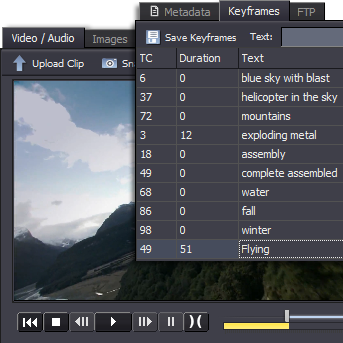
Timeline scripting... XPRESS also allows users to add searchable keywords along the timeline of clips. The keywords can be added both to key frames and to durations along the time line of clips, and they can be used for clip navigation.
ODBC... ViArchive XPRESS provides an autofill function for adding metadata. This allows users to automatically fill in metadata from existing databases by an ODB Connection. Any metadata connected to the file’s task number is then added to the sidecar.
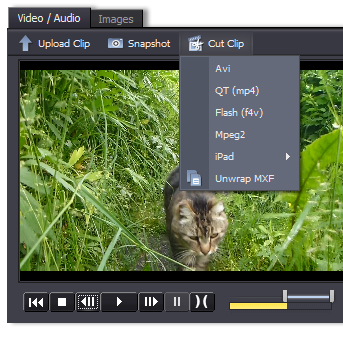
Cutting & transcoding... Cutting out a segment is quick and user friendly. Users select the segment they wish to cut out, choose export format and save the file. Entire files may be transcoded as well. The solution supports the H264 / AAC codec (mp4 and f4v). Users may also cut and transcode files in batch.
MXF-files... ViArchive XPRESS supports unwrapping MXF files. This functionality extracts metadata and saves the video in AVI format with metadata in attached sidecar.
Screen capture... XPRESS offers a built in screen capture function which allows you to record your screen (i.e. videos) and save to your archives.
XPRESS also allows users to set up a local archive on the workstation. Ingested files are fully searchable in all metadata, and users may also use calendar search to find files from a particular date.
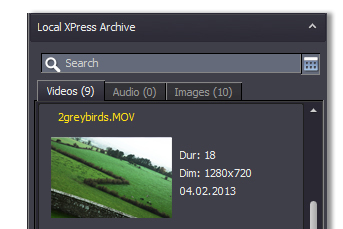
Users of ViArchive XPRESS can access server archives and execute actions on archived files. This allows users to search archived content and adjust metadata on files.
Furthermore, the users can cut, transcode and download files from the archive directly in the desktop application.
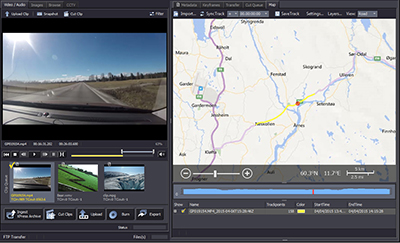
ViArchive XPRESS provides a map module which allows users to sync videos with GPS data along the timeline.
A video file and a GPX file (containing GPS points recorded along with the video recording) can be paired and synced. This means that for example a clip which was recorded from a moving vehicle can be accompanied by a map of the route the vehicle was driving. Current location in the map is also showed as you play the clip.
The map module can also be used to view and edit images GPS location.
| Standard | Pro | Extended | |
| Import media in batch | |
|
|
| View / play, video clips, audio files and images | |
|
|
| Viewing and editing metadata & saving XMP-sidecar | |
|
|
| Adding keywords to keyframes & durations along the timeline of video & audio clips | |
|
|
| Autofill metadata from database (ODBC)* | |
|
|
| Metadata template editor | |
|
|
| Screen capture & snapshot function | |
|
|
| Unwrap MXF files** | |
|
|
| Local Xpress archive with search engine | |
|
|
| Exporting files to other applications | |
|
|
| Uploading files to server archives via FTP | |
|
|
| Burning data DVDs | |
|
|
| Map module (Bing Maps & Open Street Maps) | |
|
|
| Cut and transcode video files | |
|
|
| Access, browse & search ViArchive Server archives | |
||
| Edit metadata & keyframes of video clips archived on the server | |
||
| Cut & download clips from ViArchive Server | |
||
| Map module: connect to Web Map Tile Services (WMTS) | |
* Connect to existing databases.
** Additional codecs may apply for HD / special formats.